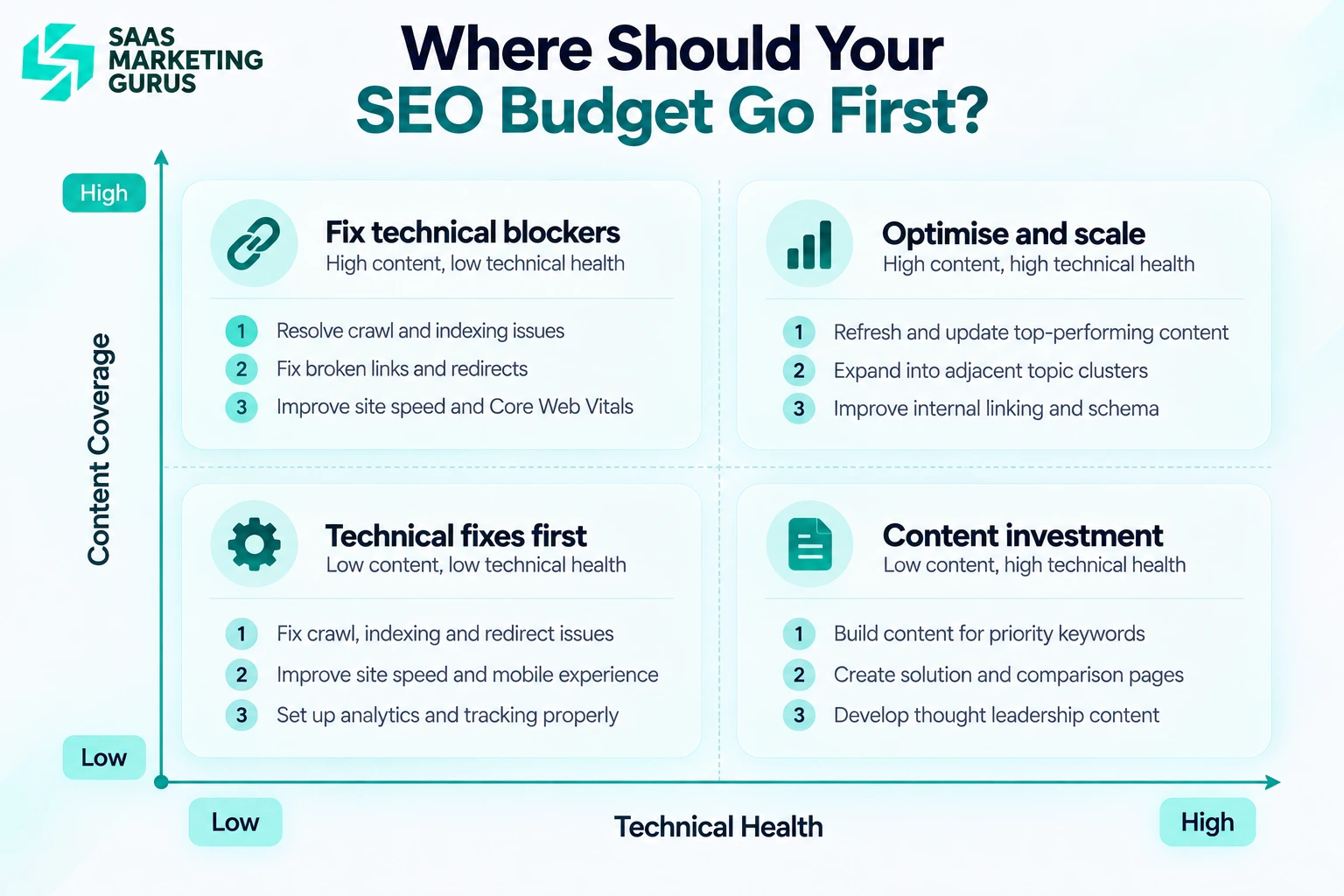
Prioritize technical SEO when a confirmed access, rendering, or configuration problem affects important SaaS pages. Prioritize content SEO when those pages are accessible but miss relevant buyer questions. If both problems exist, fix the affected pages while continuing useful content work elsewhere.
The technical SEO vs content SEO decision starts with diagnosis. A page missing from Google’s index needs investigation, but that finding alone does not prove a technical fault.
SaaS Marketing Gurus (SMG), a B2B SaaS marketing agency, brings technical and content work together through its SaaS SEO services. This guide explains how to choose the next task, assign responsibility, and check whether it helped.
Technical SEO vs Content SEO: What Is the Difference?
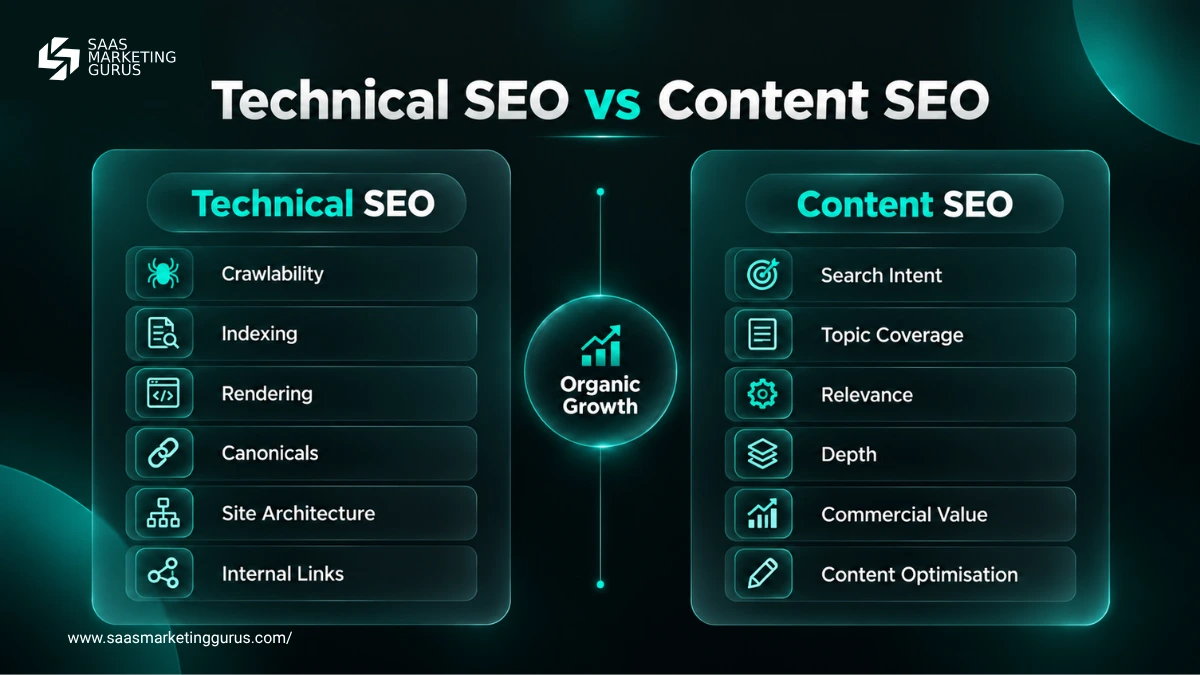
Technical SEO addresses how search engines access and process your website. Content SEO addresses how well its pages answer relevant searches. They overlap in site structure, internal linking, and the way information appears on a page.
| Decision factor | Technical SEO | Content SEO |
|---|---|---|
| Main question | Can search engines access and process the intended page? | Does the page answer a valuable buyer question? |
| Typical work | Rendering, server responses, indexing directives, canonical signals | Intent research, page creation, consolidation, examples, product detail |
| Typical owner | SEO specialist working with a developer | Content strategist working with a writer and product expert |
| Effort drivers | Template dependencies, engineering availability, deployment testing | Research depth, product access, expert review, writing scope |
| Initial verification | The diagnosed issue is resolved on affected URLs | The page addresses the documented intent gap |
| Outcome measures | Visibility and qualified conversions after the fix | Relevant search visits and qualified conversions after the update |
| Limitation | Eligibility does not guarantee indexing or rankings | Strong content cannot overcome a confirmed access blocker |
Google’s technical eligibility requirements include allowing Googlebot access, returning HTTP 200, and providing indexable content. Meeting them does not guarantee inclusion in search. See Google’s technical requirements, updated December 2025.
For SaaS teams, assess both disciplines across product pages, integrations, comparisons, documentation, and supporting articles.
When SaaS Technical SEO Should Come First
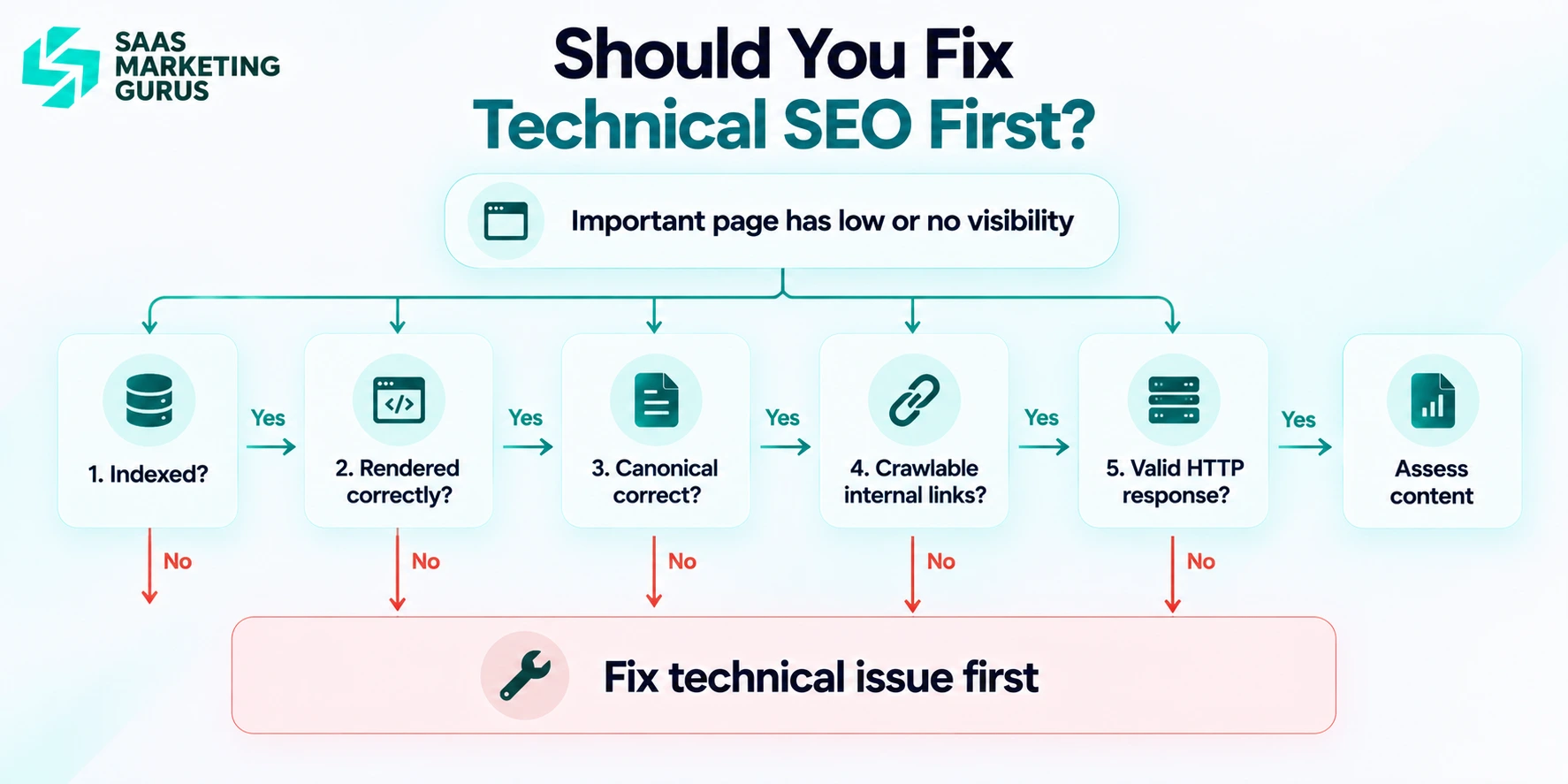
Technical SEO should take priority when Google has difficulty accessing or processing pages that matter to your business.
1. Important pages are not indexed
Investigate an important page that is not indexed before deciding which work it needs. An accidental noindex directive calls for a configuration fix. A duplicate page or a page with little distinct value may need consolidation or better content.
Consider an illustrative healthcare CRM landing page. If inspection reveals an unintended noindex, remove it, confirm the page remains accessible, and monitor its indexing status after Google revisits it.
Check the HTTP response, crawl permissions, indexing directives, canonical signals, sitemap inclusion, and internal links. Record the actual reason shown in Search Console.
A robots.txt block controls crawling. It does not reliably remove a URL from search, and it can prevent Google from seeing a noindex directive.
2. JavaScript hides important content
JavaScript becomes a technical priority when Google cannot obtain important content or links after rendering. Using React, Next.js, or Vue is not itself evidence of an SEO problem.
Inspect an affected page’s rendered HTML. Confirm that the main copy, product details, and navigation links are present. Investigate blocked resources, failed requests, and content that requires interaction before it appears.
A sparse initial HTML response alone does not prove failure. Google can render JavaScript, so compare what it receives with what users need to find.
After a change, repeat the inspection on representative pages using the same template. Follow Google’s JavaScript SEO guidance, updated March 2026.
3. Your site creates thousands of URL variations
URL variations need attention when they produce conflicting canonical signals, unwanted indexed pages, or a demonstrated crawling problem. Their existence alone does not justify postponing content work.
A tracking parameter may leave the underlying page unchanged. A filter may create a genuinely different result. Inspect the content and intended purpose before treating both as duplicates.
For equivalent pages, align internal links, sitemap entries, and canonical signals around the preferred URL. Do not use robots.txt as a canonicalization method.
Google may choose a different canonical despite your preference. Check the result rather than assuming the tag settled it. See Google’s canonicalization guidance, updated July 2026.
4. Important pages have weak internal links
Prioritize internal linking when important pages lack useful, crawlable paths from related content. Click depth is a clue to investigate, not proof that Google cannot discover a page.
For example, an analytics product page should have relevant links from supporting product, industry, and educational pages. Use anchor text that describes the destination and helps readers choose their next step.
This work can involve both teams. A developer may need to repair navigation, while an editor adds contextual links. Verify that the links work and point to the intended canonical page.
When Content SEO Should Come First
Content SEO should lead when a relevant buyer need is missing or poorly answered and no confirmed technical blocker prevents the affected page from being accessed. Useful research and updates can also continue on unaffected pages while developers fix problems elsewhere.
1. You have no page for valuable search intent
Create or improve content when buyers have a relevant question that your site does not adequately answer.
An expense management product might need better coverage of startup requirements, integrations, or comparisons. However, each keyword variation does not automatically need a separate page.
Review the search results and customer questions first. If two searches need essentially the same answer, one strong page may serve both. Create a separate page when the audience, task, or required information is meaningfully different.
Use the SaaS keyword research guide to connect those decisions to buyer intent and business value.
2. Your pages rank, but they do not fully answer the query
Improve an existing page when a review identifies specific information that relevant searchers need and the page lacks.
Rankings between positions 8 and 20 can help you shortlist pages for investigation. They do not establish that content is the cause.
Compare the page with the intent behind its queries. Does a buyer need implementation details, product limitations, pricing context, examples, or a clear comparison? Add the missing information that supports the decision.
Avoid expanding the page simply to match a competitor’s word count. Record the gap, make the change, and track relevant queries and conversions.
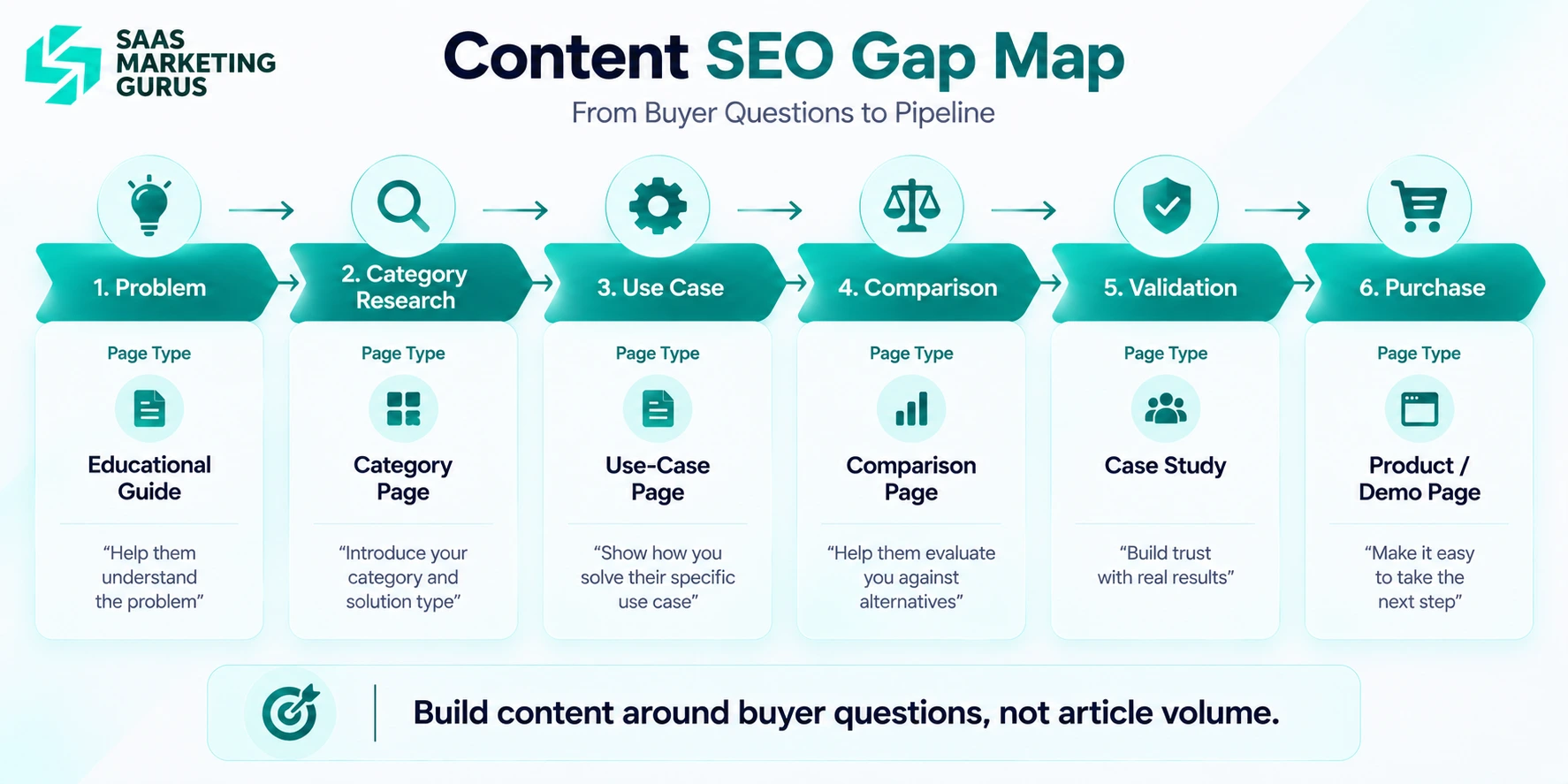
3. Your competitors cover the buyer journey better
A SaaS competitor might have separate pages for:
- Product category
- Industry
- Use case
- Alternative
- Comparison
- Integration
- How-to
If your site has one generic product page while competitors address each stage of research, content coverage is likely the larger constraint.
Use Search Console to Decide What to Prioritize
Use Google Search Console to identify affected pages and search patterns, then combine that evidence with a crawl and content review. Search performance shows where to investigate; it does not automatically explain the cause.
The B2B SEO audit checklist for SaaS provides a broader process when you need to examine the whole site.
Step 1: Check indexing
Inspect the pages that matter to the current decision. Record their indexing status, crawl information, directives, and canonical details where available.
Distinguish the indexed record from a live test. The indexed record can show Google’s selected canonical; a live test cannot predict that selection or guarantee indexing.
If Google selects another page, compare both the technical signals and the content. A canonical discrepancy can involve either. Follow Google’s canonical troubleshooting guidance, updated August 2026.
Step 2: Check search performance
Compare relevant periods, then examine queries and pages rather than relying on site averages. Keep country, device, and search type consistent where they affect the comparison.
Look for changes in impressions, clicks, click through rate, and average position. Separate branded demand from broader category searches when useful.
High impressions with few clicks may warrant a title and intent review. Declining traffic may also reflect seasonality, changing demand, or changes in search results.
Use Google’s traffic diagnosis guidance, updated December 2025 to avoid treating every decline as a content problem.
Step 3: Crawl the website
Use a crawler such as Screaming Frog to investigate responses, redirects, canonical signals, indexing directives, internal links, and page templates.
Interpret the findings before creating tasks. A valid redirect is not automatically a defect, and an intentionally removed page may correctly return 404.
To investigate orphan pages, compare the crawl with additional URL lists, such as sitemaps, Search Console exports, or analytics. A crawl following internal links alone cannot discover every unlinked page.
Review content usefulness manually. Low word count does not, by itself, make a page inadequate.
Step 4: Match the problem to the work
Assign work only after the evidence supports a diagnosis.
| Confirmed finding | First action | Owner and verification |
|---|---|---|
Important page has accidental noindex | Correct the directive | Developer and SEO specialist; retest and monitor indexing |
| Main content is absent after rendering | Repair content delivery | Developer; inspect affected templates again |
| Equivalent URLs send conflicting canonical signals | Align the signals | SEO specialist and developer; check implementation and subsequent selection |
| Page lacks a relevant buyer answer | Improve or create the appropriate content | Content team and product expert; review coverage and outcomes |
| Important page lacks useful internal links | Add contextual links or repair navigation | Content or development team; confirm the links work |
| Page ranks below expectations, cause unknown | Investigate intent, competition, demand, and technical condition | SEO specialist; document the diagnosis before assigning a fix |
| Technical and content issues affect different pages | Run both workstreams | Separate owners; track affected URL groups |
For each task, record the affected URLs, evidence, expected benefit, effort, dependencies, and completion check. Revisit priorities when new evidence changes the diagnosis.
Identify Your Next SEO Priority
Discuss the technical and content issues affecting your most important SaaS pages.
Build a Technical SEO Strategy Around Revenue Pages
Do not audit every URL with the same priority.
Start with pages tied directly to revenue:
- Product pages
- Service pages
- Industry pages
- Use-case pages
- Comparison pages
- Integration pages
For each priority URL, check indexation, canonicalisation, rendering, HTTP status, internal links, sitemap presence, and page experience.
Then fix the problems in order of business impact.
A SaaS technical SEO strategy should make it easier for search engines to reach and process the pages your sales team needs prospects to find.
Build Your Content SEO Strategy Alongside Necessary Technical Fixes
Build content around buyer needs while resolving the technical problems that affect its delivery. Content research, expert interviews, and improvements to unaffected pages can continue during engineering work.
Start by deciding whether each topic deserves a new page or belongs on an existing one. SMG’s CLARITY framework for keyword clusters considers the customer problem, intent, search results, revenue potential, independent page value, topic connections, and measurement.
Turn that assessment into a practical brief:
- Identify the buyer question and the page responsible for answering it.
- Specify missing product detail, examples, limitations, or evidence.
- Assign a writer and a product expert.
- Link the page to its relevant pillar and supporting content.
- Define the intended next action and how you will measure it.
For an illustrative integration page, useful additions might explain supported workflows, setup requirements, limitations, and who the integration suits. Confirm the details with the product team.
Review performance after publication, using the page’s intended queries and qualified conversions. Neither a longer article nor a larger content library proves progress.
Technical SEO vs Content SEO: Which Should SaaS Companies Prioritize?
Choose the work supported by evidence on the pages that matter most.
If an important product page has a confirmed access problem, assign the fix and define how you will verify it. If an accessible page misses a buyer’s question, assign a content update with a clear information gap and conversion goal.
When the problems affect different pages, run the work together. Where one task depends on another, make that dependency explicit.
Your next SEO plan should name the priority URLs, the diagnosed problem, the owner, and the success measure. Review implementation first, then search visibility and qualified business outcomes.
Ready to Fix the SEO Problems Holding Your SaaS Site Back?
SMG supports SaaS companies with technical SEO, keyword strategy, content planning, and performance tracking. Explore the SaaS SEO services guide for the broader approach.
If your audit and content backlog compete for the same budget, bring your priority pages and current questions to the discussion.
Book a free consultation to discuss your SEO priorities.
Frequently Asked Questions
Can content problems affect which page Google indexes?
Yes. Google’s canonical selection can involve content quality and similarity as well as technical signals. If another URL is selected, examine both pages before assuming a configuration error.
Does using JavaScript mean technical SEO should come first?
No. Investigate whether Google can access the important content after rendering. A JavaScript framework or a sparse initial HTML response alone does not establish a problem.
Should all technical issues be fixed before publishing content?
No. Resolve confirmed blockers affecting the pages you plan to publish or promote. Research and content work on unaffected pages can continue while developers handle other fixes.
How should a small SaaS team divide its SEO budget?
Compare business relevance, evidence, effort, and dependencies. Fund the most consequential confirmed problem first, then reassess. This article does not recommend a universal percentage split.
What should you measure after technical or content changes?
First verify the intended change on the affected pages. Then monitor relevant search visibility, qualified visits, and conversions against an appropriate baseline. Record other changes that could influence the result.