The most common SaaS SEO mistakes are chasing search volume instead of buyer intent, publishing generic content, leaving product pages unlinked, letting your own pages compete, ignoring technical errors on money pages, neglecting authority, measuring rankings instead of pipeline, and scaling unreviewed AI content. Fix access problems first, then intent and overlap.
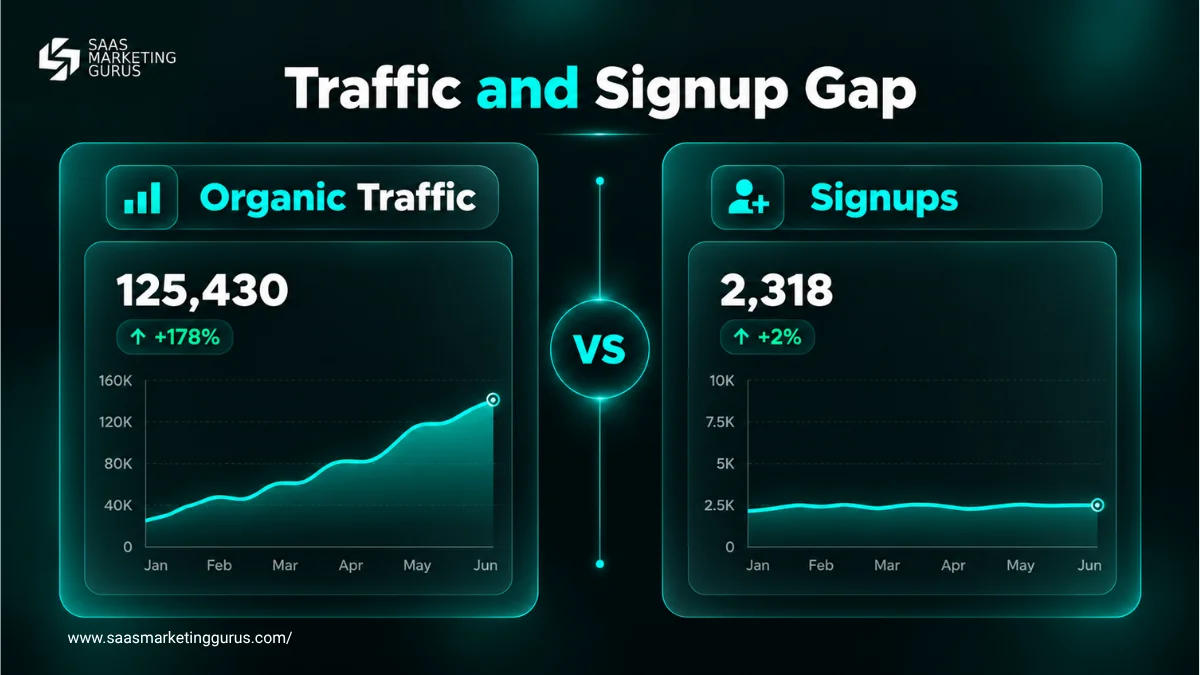
If traffic climbs while demo requests stay flat, one or more of these mistakes is usually the reason. SaaS Marketing Gurus (SMG) is a B2B SaaS marketing agency specializing in SaaS SEO, Generative Engine Optimization (GEO), Reddit marketing, Quora marketing and Product Hunt launches. This guide shows how to spot each mistake in Google Search Console and GA4, what to fix, and which fix to make first.
Which SaaS SEO Mistake Is Costing You Demos?
The fastest way to find your costliest SaaS SEO mistake is to match the symptom you see to the report that confirms it. Each mistake leaves a distinct pattern in Search Console or GA4, so you can diagnose before you rewrite anything.
| Symptom you see | Likely mistake | Where to confirm it | First fix |
|---|---|---|---|
| Traffic up, demos flat | Buyer-intent gap (1) or broken measurement (7) | GSC Queries vs GA4 key events by landing page | Map top queries to pages that convert |
| Two URLs swap for one query | Cannibalization (4) | GSC Performance, filter by query, Pages tab | Merge and 301 the weaker URL |
| Money page missing from results | Technical error (5) | GSC URL Inspection and Page indexing report | Remove noindex, fix canonical or rendering |
| Rankings stuck at page 3 to 5 | Weak authority (6) | Backlink profile vs top 5 ranking pages | Earn mentions from sources buyers trust |
| Articles rank, feature pages do not | Weak product linking (3) | Internal links pointing to feature pages | Link articles to matching feature pages |
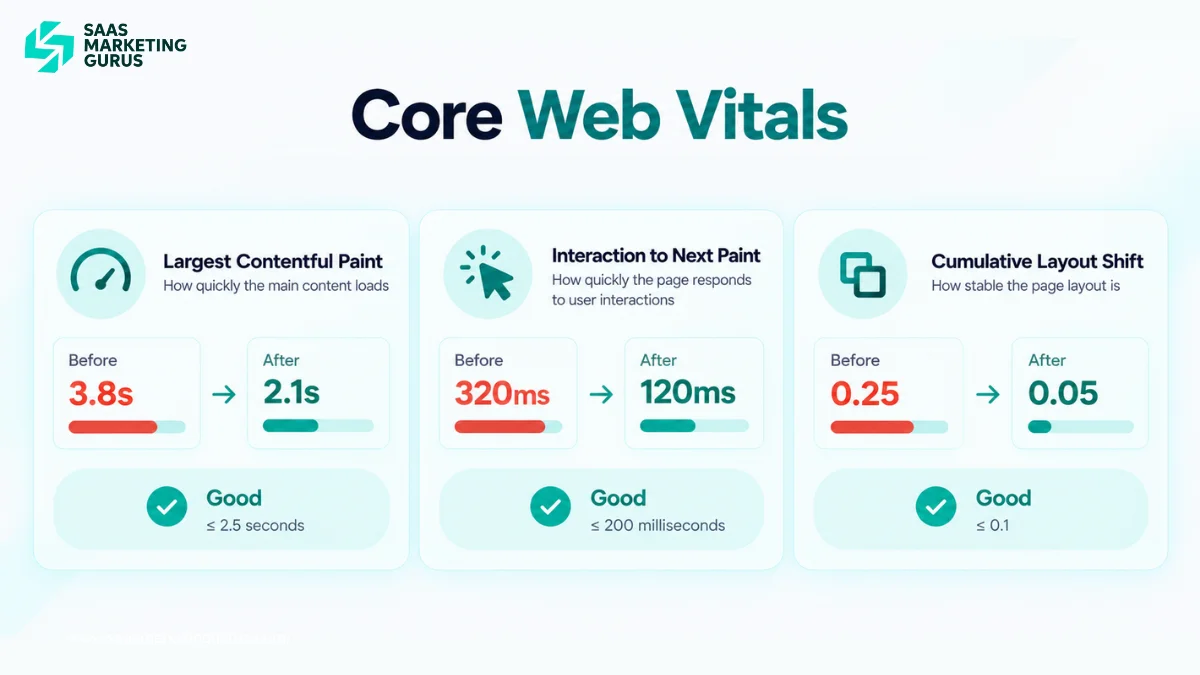
Page experience checks belong in this pass too. Google’s Core Web Vitals guidance (Search Central, updated December 2025) asks you to load the largest content element within 2.5 seconds, so flag slow pricing and signup pages while you review the Page indexing report.
1. Targeting Traffic Instead of Buyer Intent
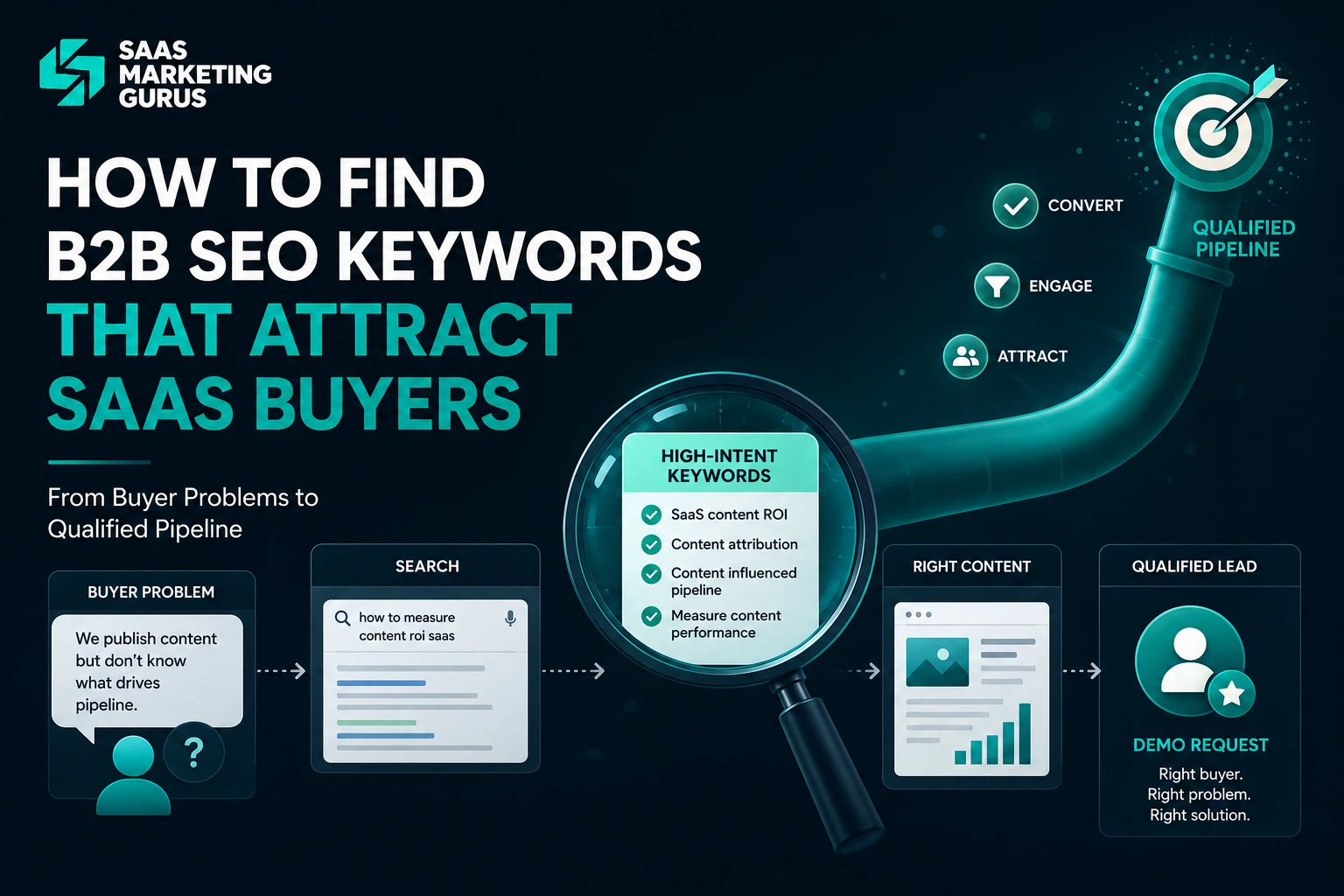
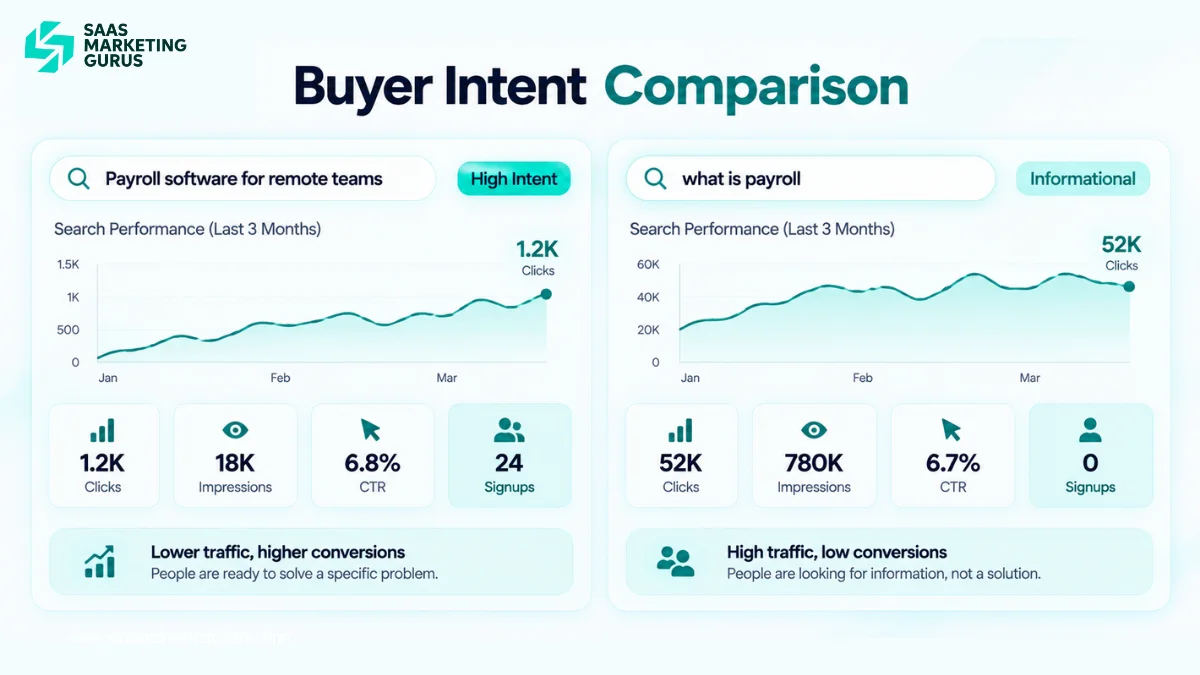
Targeting high-volume informational keywords brings readers who will never buy. SaaS SEO pays off when your keyword list reflects the problems, use cases, integrations and pricing questions your buyers search while evaluating software.
“What is payroll” attracts students and job seekers. “Payroll software for remote teams” attracts someone with a budget and a deadline.
To check this, export your top 50 Search Console queries and place them next to the landing pages that generate demos in GA4. If the two lists barely overlap, rebuild your SaaS keyword research around buyer questions pulled from sales calls, support tickets and comparison searches.
SMG scores each candidate topic with its CLARITY framework for keyword clusters, which checks Customer Problem, Level of Intent, Alignment With SERP, Revenue Potential, Independent Page Value, Topic Connection and Yield Measurement. A keyword that fails Level of Intent or Revenue Potential rarely deserves its own page.
2. Publishing Generic Content That Adds Nothing New
Generic content fails because it repeats what already ranks and gives buyers no reason to trust your product. Google’s guidance on helpful, people-first content asks whether a page shows first-hand expertise and whether it contains easily verified factual errors.
Before publishing, compare your draft with the top five results and list what they all say. Then add what they lack: product screenshots described in text, original data, a real workflow or the objections your sales team hears every week.
A CRM article on lead qualification should walk through how a lead moves from form submission to scoring to sales follow-up inside the product. Definitions alone prove nothing about product knowledge.
3. Leaving Product Pages Out of Your Content
Articles that never link to feature, integration or comparison pages leave buyers with no next step. Your blog earns the visit; your commercial pages earn the demo, so the path between them has to be obvious.
Map each product capability to the searches buyers run about it: features, integrations, security, alternatives and pricing. Build one commercial page per capability, then link to it from every relevant article with descriptive anchor text.
A guide on reducing customer churn should link to your retention analytics feature page in the paragraph where churn measurement comes up. That link helps the reader and sends internal authority to a page that converts.
4. Letting Your Own Pages Compete for the Same Query
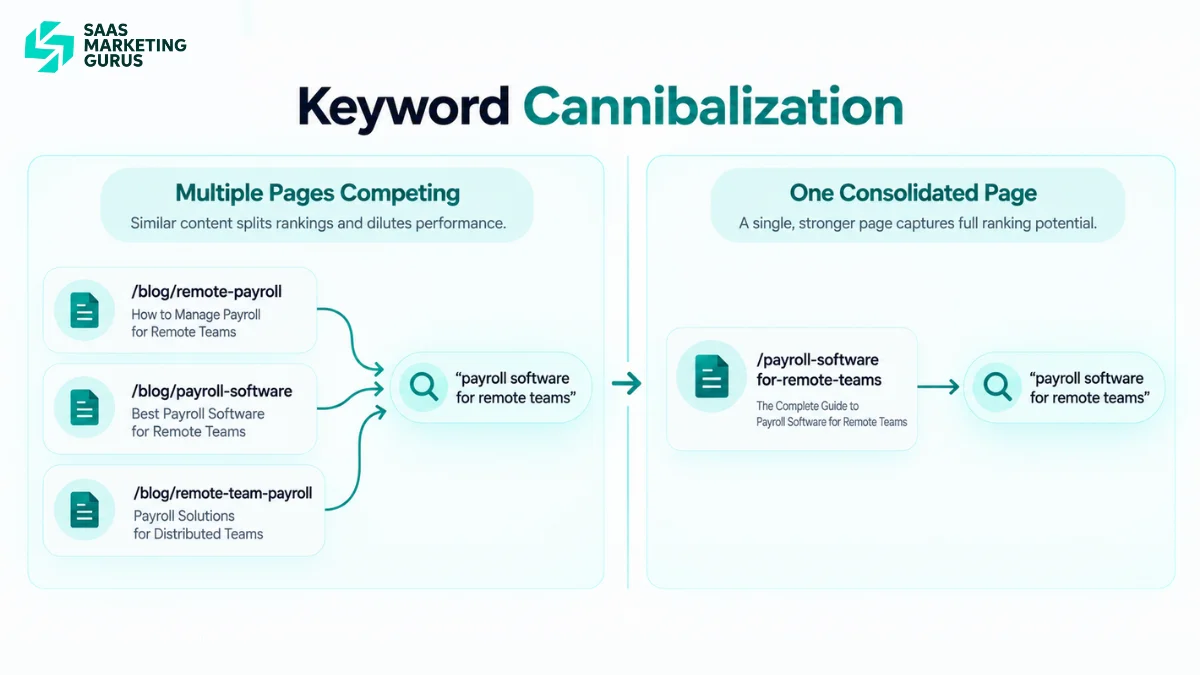
Keyword cannibalization happens when two or more of your pages answer the same search need, so neither holds a stable position. In Search Console it shows up as two URLs taking turns earning impressions for the same query.
To confirm it, open the Performance report, filter by the exact query and check the Pages tab. If two similar URLs both collect impressions over the same period, decide which page better serves the intent.
Then consolidate. Google’s documentation on consolidating duplicate URLs (updated July 2026) lists redirects as the strongest signal for choosing a canonical, ahead of rel=”canonical” tags and sitemap inclusion.
Merge true duplicates into the stronger page and 301 the weaker URL. If both pages serve different audiences, rewrite one so its title, H1 and angle target a distinct intent, then link the two pages to each other.
5. Ignoring Technical Errors on Money Pages
Technical errors hurt SaaS SEO most when they hit pricing, product, comparison and signup pages. Noindex tags, broken canonicals and JavaScript rendering failures often appear after a redesign, a CMS migration or a product release.
Start every technical review with your money pages, not the sitewide warning count. Use URL Inspection to confirm Google can crawl, render and index the preferred version of each page.
Page speed matters on these same pages. Meeting the 2.5-second LCP target does not guarantee better rankings, but it removes friction at the moment a buyer decides whether to book a demo.
6. Neglecting Authority Beyond Your Own Site
Strong content can stall on page three when competitors have more links and brand mentions from sources buyers trust. Authority tells search engines, and buyers, that other people vouch for you.
Compare your referring domains with the top five pages for your priority keywords. If the gap is wide, content improvements alone will not close it.
Earn authority where B2B SaaS buyers already look. That means original data other writers cite, integration partner pages, review profiles on G2 and Capterra, and genuine answers in the Reddit and Quora threads where buyers compare tools. Skip paid link schemes and low-quality directories, which add risk without adding trust.
7. Measuring Rankings Instead of Pipeline
Rankings show visibility, not revenue. A SaaS SEO program should report organic sessions, conversion rate and qualified pipeline by landing page, because a page with modest traffic can outperform a popular one if its visitors book demos.
Check your measurement before your strategy. In GA4, confirm that demo bookings and trial signups are set up as key events; if they are not, every SEO report you read is blind to revenue.
SMG’s BRAVO SEO case study shows the outcome worth tracking: the employee recognition platform reached 20+ demos per week alongside 1,000+ daily organic visitors. Demos were the metric that mattered, not the visitor count.
If sessions rise while conversions stay flat, work through the SEO conversion funnel stage by stage: queries, page message, product fit and next step. Do this before you publish more content.
8. Scaling Unreviewed AI Content or Chasing AI Search Tricks
Publishing large volumes of lightly reviewed AI content can fall under Google’s spam policy on scaled content abuse, which covers pages created mainly to manipulate rankings no matter how they are produced. The risk comes from volume without value, not from the tool itself.
The opposite mistake is chasing special tactics for AI answers. Google’s guide to AI features and your website (updated December 2025) states that AI Overviews and AI Mode have no additional requirements beyond standard SEO best practices.
What helps is clarity: answer-first passages, consistent entity names and pages that stand alone when quoted. That is the core of answer engine optimization for SaaS, and it also makes your pages easier for human buyers to scan.
How Should You Prioritize SaaS SEO Mistakes?
Fix SaaS SEO mistakes in order of access, intent, overlap, authority and measurement. A page Google cannot crawl or index gains nothing from better copy, so technical access comes first.
- Access: fix crawling, rendering and indexing on pricing, product, comparison and signup pages.
- Measurement: confirm demos and trials fire as GA4 key events, so every later fix can be judged.
- Intent: realign pages whose queries do not match what the page sells.
- Overlap: merge or differentiate cannibalizing URLs.
- Links and authority: connect articles to commercial pages, then build external authority.
Rank each issue by business impact and the number of affected pages. If you are unsure whether your bottleneck is technical or editorial, technical SEO vs content SEO walks through that decision, and a full B2B SaaS SEO audit surfaces these issues across a larger site.
Conclusion
Most SaaS SEO mistakes share one root cause: the program optimizes for visibility while the business needs pipeline. Traffic that never reaches a product page, a merged URL or a tracked demo is activity, not growth.
Start with the diagnosis table. Pick the symptom that matches your data, confirm it in the listed report and fix that mistake before touching the rest. Measure success by demo requests from organic landing pages over the next 60 to 90 days, and re-run the table whenever a migration, redesign or unexplained drop occurs.
If you want a second set of eyes on where your SaaS SEO is leaking pipeline, book a free consultation with SMG and get a prioritized fix list for your highest-value pages.
Frequently Asked Questions
What is the biggest SaaS SEO mistake?
The biggest SaaS SEO mistake is choosing keywords by search volume instead of buyer intent. High-volume informational terms attract readers who never buy. Compare your top Search Console queries with the pages that generate demos, then shift effort toward use case, comparison, integration and pricing searches that buyers run while evaluating software.
Why is my SaaS organic traffic growing but demos are not?
Growing traffic with flat demos usually means your site ranks for broad informational searches while commercial pages stay weak or hard to reach. It can also mean demo bookings are not tracked as GA4 key events. Check tracking first, then confirm high-traffic articles link clearly to relevant feature, comparison or demo pages.
How do I know if my SaaS pages are cannibalizing each other?
Open the Search Console Performance report, filter by the exact query and check the Pages tab. If two similar URLs both earn impressions for that query over the same period, they are likely competing. Merge true duplicates with a 301 redirect, or rewrite one page to target a clearly different intent.
Does AI-generated content hurt SaaS SEO?
AI-generated content hurts SaaS SEO when it is published at scale without adding value. Google’s spam policy on scaled content abuse applies to unoriginal pages made mainly to manipulate rankings, however they are produced. AI-assisted drafts reviewed by a subject expert, with real product knowledge and verified facts, carry far less risk.
Do I need a separate strategy to appear in Google AI Overviews?
No separate technical strategy is required. Google states that AI Overviews and AI Mode have no additional requirements beyond standard SEO best practices. Pages with direct answers, clear structure, consistent entity names and verified facts are easier for both AI systems and human buyers to understand and quote.
How often should a SaaS company audit its SEO?
A SaaS company should check indexing, key events and money pages monthly, and run a full SEO audit every six to twelve months. Run an extra audit after a site migration, redesign, major product release or unexplained drop in organic visibility, since those events cause most technical SEO errors.